
Artificial Intelligence Journey with Mistral and Llama
I started my journey into the world of AI, with Mistral as my first large language model, It’s a 7B model with Apache 2.0 license. In order to run this locally I am using llama.cpp which is port of Facebook’s LLaMa model in C/C++. This is also an amazing open source project by @ggerganov which allows running quatized model on local hardware. Am going to be running this on Apple Silicon.
Here’s what i did to get started
- Clone the llama.cpp repository, and make locally
git clone https://github.com/ggerganov/llama.cpp
cd llama.cpp
make- Next up, Download the 5 bit quatized Mistral model from Hugging Face
wget https://huggingface.co/TheBloke/Mistral-7B-v0.1-GGUF/resolve/main/mistral-7b-v0.1.Q5_K_M.ggufNote on Quantization - Model quantization refers to the process of reducing the number of bits used to represent the weights and activations of a neural network model. This can be done by converting floating-point values to fixed-point representations, which are typically more efficient in terms of memory usage and computational cost. Quantized models can also benefit from hardware acceleration on specialized processors such as GPUs or TPUs. This allows running large models on machine with smaller compute or GPU hardware.
- Now lets get llama running, at the time of writing llama has a cli for starting a server which would allow to interact with the model via a chat and api interface
./server -m ../models/mistral-7b-v0.1.Q5_K_M.gguf -c 4096 --host 0.0.0.0 --port 9001
- This allows me explore different ways to interact with mistral modal using llama cpp.
Exploring the api interface
- Make an api request to get completion.
curl --request POST \
    --url http://localhost:9001/completion \
    --header "Content-Type: application/json" \
    --data '{"prompt": "Building a website can be done in 10 simple steps:","n_predict": 128}'
to which i get below response
{
  "content": "\n\n### 1. Register a domain name:\n\nThis is the first thing you need to do when building a website. The best domain names are short, memorable and easy to spell. They should also be relevant to your business or brand.\n\n### 2. Choose a hosting provider:\n\nOnce you’ve registered your domain name, you’ll need to choose a hosting provider. There are many different hosting providers out there, so it’s important to do some research before making your decision. Some factors you may want to consider include price, uptime and customer support.\n\n### 3.",
  "generation_settings": {
    "frequency_penalty": 0.0,
    "grammar": "",
    "ignore_eos": false,
    "logit_bias": [],
    "min_p": 0.05000000074505806,
    "mirostat": 0,
    "mirostat_eta": 0.10000000149011612,
    "mirostat_tau": 5.0,
    "model": "../models/mistral-7b-v0.1.Q5_K_M.gguf",
    "n_ctx": 4096,
    "n_keep": 0,
    "n_predict": 128,
    "n_probs": 0,
    "penalize_nl": true,
    "presence_penalty": 0.0,
    "repeat_last_n": 64,
    "repeat_penalty": 1.100000023841858,
    "seed": 4294967295,
    "stop": [],
    "stream": false,
    "temp": 0.800000011920929,
    "tfs_z": 1.0,
    "top_k": 40,
    "top_p": 0.949999988079071,
    "typical_p": 1.0
  },
  "model": "../models/mistral-7b-v0.1.Q5_K_M.gguf",
  "prompt": "Building a website can be done in 10 simple steps:",
  "slot_id": 0,
  "stop": true,
  "stopped_eos": false,
  "stopped_limit": true,
  "stopped_word": false,
  "stopping_word": "",
  "timings": {
    "predicted_ms": 2109.382,
    "predicted_n": 128,
    "predicted_per_second": 60.68128010952971,
    "predicted_per_token_ms": 16.479546875,
    "prompt_ms": 333.47,
    "prompt_n": 14,
    "prompt_per_second": 41.9827870573065,
    "prompt_per_token_ms": 23.819285714285716
  },
  "tokens_cached": 142,
  "tokens_evaluated": 14,
  "tokens_predicted": 128,
  "truncated": false
}
Next question i had is - What does these generation settings mean, So i asked the model to explain it to me -
- frequency_penalty (float): This controls how much penalty is applied for tokens that occur frequently in the training data. A higher value means more penalty, which can result in less repetitive or predictable output. The default value is 0.0.
- grammar (string): This specifies a grammar file to use during generation. If provided, this will be used to generate grammatically correct text based on the specified rules. Otherwise, the model will generate text without considering any specific grammatical constraints.
- ignore_eos (bool): This controls whether or not the end-of-sentence token is ignored when generating text. Setting it to true means that the model will ignore the EOS token and continue generating until a new one is encountered, resulting in longer sentences. The default value is false.
- logit_bias (list of floats): This specifies a list of biases for each vocabulary token. These biases are added to the logits during generation, which can influence the probability distribution over tokens and affect the generated text. If not provided, the model will use its default bias values.
- min_p (float): This controls the minimum probability threshold for generating a token. Tokens with probabilities below this value will be ignored during generation. The default value is 0.05.
- mirostat (int): This specifies the number of iterations to perform Mirostat optimization before starting text generation. If not provided, no Mirostat optimization will be performed.
- mirostat_eta (float): This controls the learning rate for Mirostat optimization. A higher value means faster convergence but can also result in more oscillation around the optimal solution. The default value is 0.1.
- mirostat_tau (int): This specifies the number of iterations to wait between consecutive updates during Mirostat optimization. A larger value results in smoother updates and potentially better performance, while a smaller value can lead to faster convergence but may be more prone to oscillation. The default value is 5.
- model (string): This specifies the path to the language model file used for generation. It should point to a valid GGML-format model file containing the trained weights of the language model.
- n_ctx (int): This controls the context size, which determines how many previous tokens are considered during text generation. A larger value means more historical information is taken into account when generating new tokens, resulting in longer and potentially more coherent sentences. The default value is 4096.
- n_keep (int): This specifies the number of most recent generated tokens to keep for each batch update during Mirostat optimization. A larger value means more historical information is considered but can also lead to slower convergence or memory issues if too many tokens are kept. The default value is 0, which means no history is kept and only the current token is used for updates.
- n_predict (int): This controls how many tokens are predicted during text generation. A larger value results in longer sentences but can also lead to more repetitive or less coherent output. The default value is 128.
- n_probs (int): This specifies the number of top probabilities to consider when generating text. If not provided, all possible tokens will be considered with their respective probabilities during generation. A larger value means more options are explored but can also lead to slower performance or less diverse output. The default value is 0.
- penalize_nl (bool): This controls whether or not the model should penalize newline characters when generating text. Setting it to true means that tokens representing newlines will be given lower probabilities during generation, resulting in fewer breaks between sentences and potentially more coherent output. The default value is true.
- presence_penalty (float): This controls how much penalty is applied for tokens that occur frequently within the current context when generating text. A higher value means more penalty, which can result in less repetitive or predictable output. The default value is 0.0.
- repeatlastn (int): This specifies the number of most recent generated tokens to repeat during text generation. A larger value results in longer sentences but can also lead to more repetitive or less coherent output. The default value is 64.
- repeat_penalty (float): This controls how much penalty is applied for repeating previously generated tokens when generating text. A higher value means more penalty, which can result in fewer repeated words and potentially more diverse output. The default value is 1.1.
- seed (int): This specifies the random seed to use during generation. If not provided, a random seed will be chosen automatically. Setting it to a specific value ensures
Thats a pretty good start to be able to run the model locally and get a sense of understanding from it. I’ll dive deep into it later. What i am going to do next is explore the chat interface, which looks like below
Exploring the Chat interface
- Open a web interface at
http://localhost:9001and interact with the chat interface.
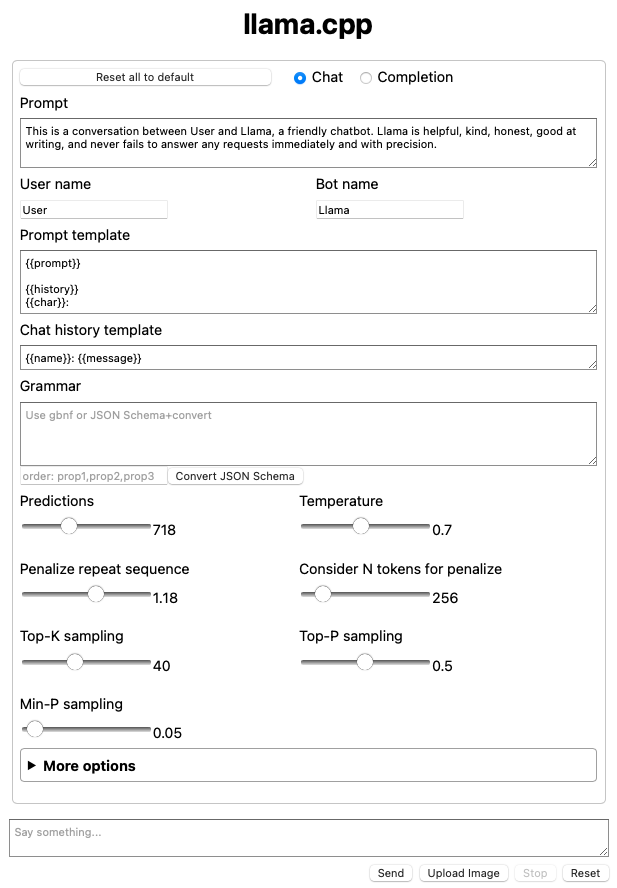
This shows some of the attributes which were came in the response above.